Capture. Mark up. Share.
Area, window or screen. Add arrows, text and shapes. Blur sensitive details. Edit every mark in its own layer.
Your apps, your windows, your everyday tools.
A beautifully simple bar that brings it all together.
For macOS 15 and later · AUD $19.95 · No subscription
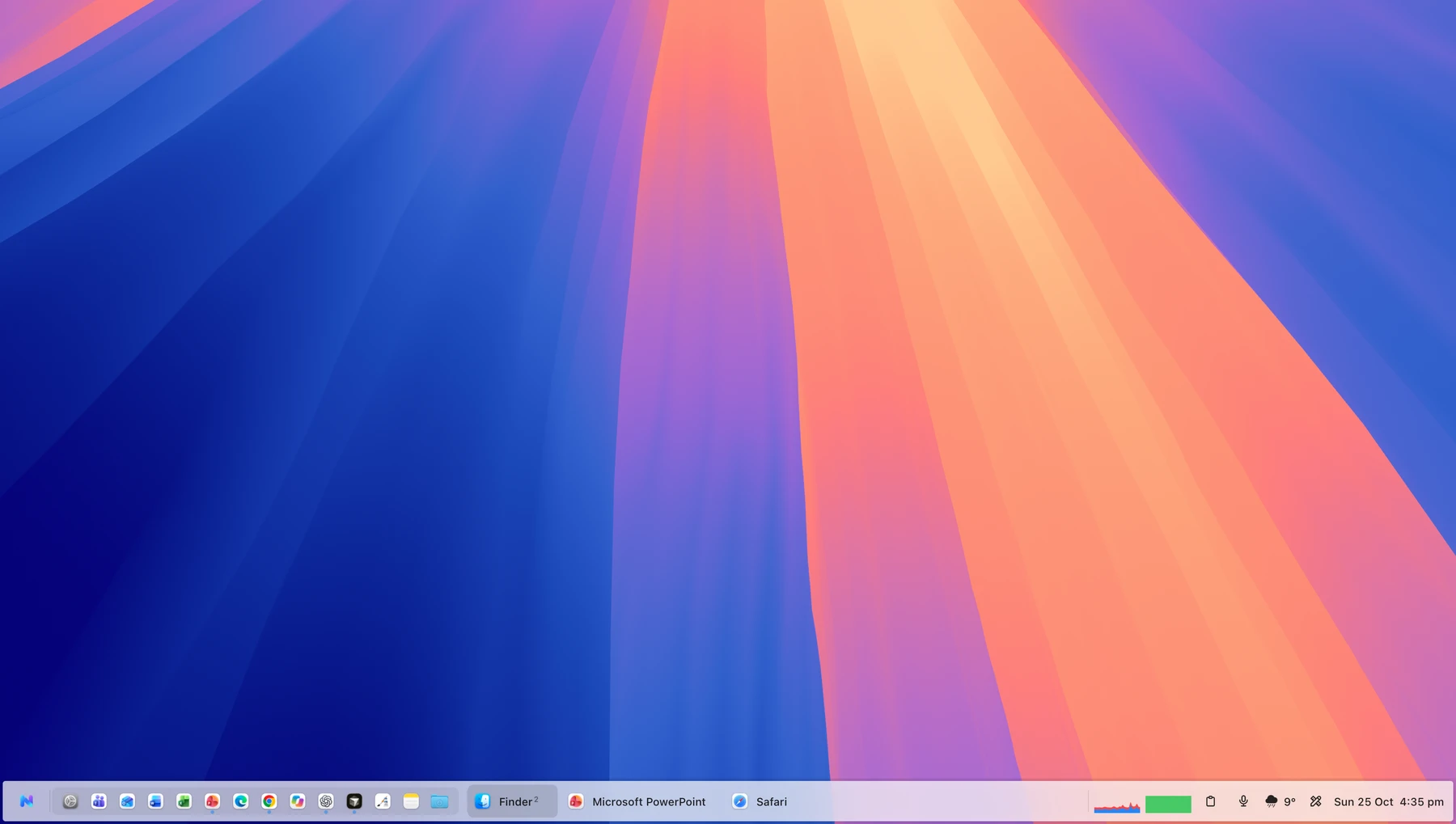
Keep your favourite apps close. Find the window you meant. Open a whole workspace in one go. NewBar gives the things you use all day a place of their own.
NewStart Command puts apps, files, Apple Shortcuts and saved workspaces in one searchable launcher. Browse two folders side by side, or bring your next project into focus.
Your bar can follow any edge. Give each display its own apps, or mirror them everywhere. Pin your favourites, preview windows and make space for what matters.
Hover to preview. Click to return to the one you need.
Keep apps, folders and folder stacks within reach.
Light, dark, your tint. Adjust the size and transparency.
The useful extras you reach for, without another window to keep track of.
Area, window or screen. Add arrows, text and shapes. Blur sensitive details. Edit every mark in its own layer.
Hold a key, speak, release. Offline speech recognition types into the app you’re using. Optional AI polishing works with your chosen local model or OpenAI key.
 Speech model download required. Optional cloud AI sends text to your selected provider.
Search recent clipboard items and bring them back with a click. Pause collection whenever you like.
CPU, memory, network and disk. Live tiles give you the essentials; a click opens the details.
*Weather uses your own OpenWeather account and API key. Provider terms and limits apply.
A good Dock alternative is personal. Here’s where NewBar sits alongside a few familiar choices.
| In the app |  NewBar NewBar | uBar | Sidebar | ActiveDock |
|---|---|---|---|---|
| App & window previews | Included | Advertised | Advertised | Advertised |
| Multiple displays | Included | Advertised | Advertised | Advertised |
| Application launcher / start menu | Three styles | Advertised | Advertised | Advertised |
| Screenshot editor with layers & blur | Included | Not listed | Not listed | Not listed |
| Searchable clipboard history | Included | Not listed | Not listed | Separate app¹ |
| CPU & memory information | Live tiles & processes | App CPU / RAM | Not listed | Not listed |
| Window snapping / arrangement | Not included | Command arrangement | Advertised | Preview controls |
| Update model | 12 months included; optional renewal | Paid version upgrades | All updates included | See vendor terms |
Based on published vendor pages, checked 25 October 2026; competitors have not been independently tested. “Not listed” means the feature was not described on the reviewed product page. ¹ ContextClip is a separate MacPlus product. Features and terms can change. Sources: uBar ↗, Sidebar ↗, ActiveDock ↗.
Try it for seven days. Make it yours when it feels right.
A one-off licence. Includes 12 months of updates.
Getting ready for launch. Create your account when registration opens; downloads and checkout will open with the first public release.
TodayBuy NewBar and receive every eligible update released during your first 12 months.
After 12 monthsYour eligible version keeps working. No automatic renewal and no recurring charge.
When you’re readyBuy another 12 months of updates at the price offered then. Renew early to add time; renew later to start a new period.
Personal licence for up to two Macs you use. Trial: one Mac. Beta access follows the expiry set by the owner.
NewBar is a companion taskbar. You can keep the Dock visible or let NewBar hide it while it’s running. Your previous Dock setup returns when you quit NewBar.
Accessibility supports window control, and Screen Recording supports window previews and screenshots. Dictation needs the microphone; location and Full Disk Access are optional for the features that use them. Getting Started explains your choices.
You can keep using the versions covered by your paid licence. You simply stop receiving newer releases until you choose to buy another 12 months of updates. This is not a subscription.
Sign in to your account and enter the code shown by NewBar to pair your Mac. The release version will check its licence and available updates at launch and once a day. Paid versions retain a signed offline entitlement; trials and beta access remain subject to their expiry dates.
Account, purchase, activation, update and support information is stored by the website. Clipboard history and screenshots stay on your Mac unless you share them. Speech recognition runs locally after the model downloads. Optional OpenAI polishing sends text to OpenAI; weather requests go directly to OpenWeather. See the privacy policy for details.
Beta licences are granted by the owner to registered, verified accounts. Send a beta enquiry. Your account shows your beta expiry date.
macOS 15 and later · Launch preparation in progress